
以前用WordPress写文章都没太注意,最近才发现他会和html一样吞掉段落开头的空格,搜中文网络的时候发现的文章:WordPress文章段首空格无效的解决方法 – 知乎 (zhihu.com)。都是这种要么直接暴力编辑html,要么全部<p>样式替换。我需要有一个更灵活的方式来控制。
在使用区块编辑器的时候,我注意到区块设置里有一个额外的CSS类的设置,那么理论上只需要我预定义一个CSS样式并设置text-indent:2em;就可以了。
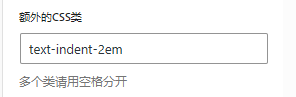
首先在外观主题的style.css文件中加入一个CSS,就叫做text-indent-2em吧。
<wp_root>/wp_content/themes/<theme_name>/style.css
.text-indent-2em {
    text-indent:2em;
}Code language: CSS (css)
然后编辑主题的functions.php,需要把style.css进行加载操作。
<wp_root>/wp_content/themes/<theme_name>/functions.php
if ( ! function_exists( 'twentytwentyfour_custom_stylesheets' ) ) :
	/**
	 * Enqueue custom stylesheets
	 *
	 * @since Twenty Twenty-Four 1.0
	 * @return void
	 */
	function twentytwentyfour_custom_stylesheets() {
		wp_enqueue_style( 'style', get_stylesheet_uri() );
	}
endif;

add_action( 'init', 'twentytwentyfour_custom_stylesheets' );
Code language: PHP (php)
如果存在CACHE,可能需要重新生成一下。之后在写文章的时候,对于需要首行缩进2个空格的内容,就在额外的CSS类这里填入text-indent-2em就OK了。
这一行没有设置text-indent-2em,虽然我在文章中输入了4个空格,但仍然不会缩进。
这一行设置了text-indent-2em,效果很明显,在区块编辑器里刚设置完就能看到效果。
不过就在我写完这篇文章的时候,我在插件库里搜到一个叫2em的插件,好像可以更方便地处理。。
参考
发表回复